
How to Strikethrough on Discord: Formatting Text in Chat
Strikethrough in Discord chat is a useful text formatting tool that allows users to cross out text for various purposes, from humor to correcting mistakes.
RELATED: Dee Snider Net Worth: Rocking the Financial World of a Heavy Metal Legend
Table of Contents
What is Strikethrough on Discord?
Strikethrough is a typographical presentation where text is shown with a horizontal line through its center. It’s used in Discord to indicate a word or sentence is no longer valid, deleted, or to add a special emphasis.
How to Strikethrough on Discord
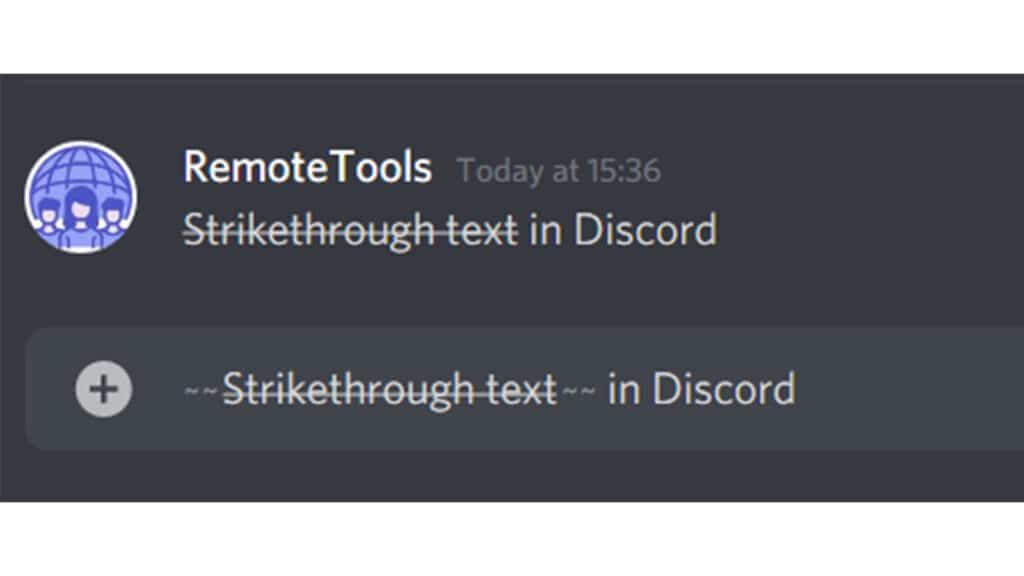
To apply strikethrough in Discord, simply use the tilde (~) symbol. Place two tilde symbols on both sides of the text you wish to cross out. For instance, typing ~~text~~ will strikethrough the word “text.”
Keyboard Shortcut for Strikethrough
The tilde key can be found in different places on the keyboard, depending on the language setting. For English (US) keyboards, it’s achieved by pressing Shift + ` (the key above Tab).
Cross-out Text in Discord
Crossing out text in Discord is similar to strikethrough. It signifies that the text is incorrect, deleted, or modified. The same ~~ symbols are used for this purpose.
Combining Different Formatting Styles
You can combine strikethrough with other formatting styles like bold or italics. For example, using ~~**text**~~ will apply both strikethrough and bold formatting to the word “text.”
Formatting on Different Devices
The method of strikethrough remains consistent across devices. Whether you’re using Discord on a desktop, Android, or iOS device, the tilde key method applies universally.
Discord’s Markdown Feature
Discord uses Markdown, a simple text formatting system, which includes various commands for text formatting, including strikethrough, bold, italics, and more.
Does Discord Have an In-Built Strikethrough Option?
In some versions of Discord, especially on desktop or web applications, you might find a context menu with a strikethrough option (represented by an ‘S’ with a line through it) after highlighting the text.
Conclusion
Strikethrough on Discord is a straightforward yet effective way to format text, adding clarity or emphasis to your messages. Understanding these simple formatting techniques can enhance your Discord chat experience.
RELATED: Is Luke Russert Married? A Closer Look at His Personal Life
FAQs about Strikethrough on Discord
- Can I use strikethrough in Discord code blocks? No, the tilde method doesn’t work in code blocks.
- Will other Discord users see my strikethrough text? Yes, strikethrough formatting is universally applied and visible to others.
- Can I remove strikethrough formatting after sending a message? Once sent, the formatting cannot be removed; you’ll need to send a new message.
- Is there a strikethrough button in Discord? In some versions, a strikethrough option appears in the context menu when text is highlighted.
- Can I combine strikethrough with other text formatting options in Discord? Yes, you can combine strikethrough with other formatting styles like bold or italics for varied text presentation.
Comments